The notion of the school librarian position being a leadership role has surfaced in a couple of my previous UBC T-L courses, and I wholeheartedly agree. When I interviewed for the T-L role at our school, I did not have any formal T-L training. They asked me why I wanted to move into the role after teaching Grade 3 for several years. Without having rehearsed a response to this question, I instinctively replied that I was ready for a leadership role in the school but not interested in administration. To me, being a school librarian is the perfect balance of teaching and leadership, without the leadership title. Not only do I have my pulse on the entire school curriculum, it is my job to build relationships with every single member of the school community (Toor & Weisburg, 2012). I need students to feel safe in the library and to trust me with their inquiries; my colleagues should be able to turn to me when in need for resources, a physical space, or even a sounding board; and I must have the strength to speak up to the administrative team so that I am heard and respected. Having positive relationships with students, teachers, and the school leadership team is truly the triple threat needed to effectively implement a learning commons philosophy.
However, it is a fine balance between leading by example and the actual leadership in the school. I have confronted some frustrating road blocks in my drive towards improving access to new resources and providing in-service for teachers in areas where I know they would appreciate support. One of my goals has been to create a library website, which would be a one-stop-shop for database access, links and tips related to the Accelerated Reader (AR) program at our school, research tips, and book list recommendations. When I pitched this idea in the summer prior to this school year, I could not believe the resistance I faced. Working in an independent school, it becomes apparent how such schools often operate as a business. There is an extensive team in the Marketing & Communications (Marcom) department, and the Director of Marcom is a member of the school’s executive team. In translation: she has a lot of power. In my first conversation with her, she brought up concerns with budgeting time and, therefore, humanpower and finances to this project. There was also the broader perspective of how this website might integrate within the existing platforms of communication we have with parents and the greater community, as well as how it might align with the design standards of the school website, and whether this was a longterm, sustainable project. What seemed like a great idea to me from a teaching perspective was one that likely appeared to be thoughtless of consideration from the business operation end of things.

I received advice from a friend that in this instance, it would be a good idea to build something myself and present it to them so they have a better idea of my vision. I’ve taken to using Google Sites to accomplish this, and I have found it to be a lot of fun playing around with the design. I do agree that this will likely be the best approach because ultimately, teachers at my school are at odds with the executive team. We simply don’t think similarly and sometimes need to follow the old teaching principle of “show, not tell.”
Within this website, I will have links to various Google Docs and Slides that I have been creating on Research Tips, Databases (school and local library), Fact Checking and Media Bias. They are still a work in progress, but I know these will be invaluable in the long run. I also like how easy it is to continually update the document after it has been shared. I have been investing my time into improved digital access to information because most of the teachers at my school are tech savvy, plus they are busy enough with various other meetings and daily teaching work. Although these are not on one central website, I have started to circulate the documents and teachers have already given me feedback on how much they appreciate it. They are also very kid-friendly and shared with students and parents. I find the best opportunities to share such ICT resources and skills with my colleagues is when I am teaching their class while they are present. Often, I will hear “I’m glad I was there, I didn’t know that…” Ultimately, it is a collaborative, sharing environment that will nurture ICT skills the best.
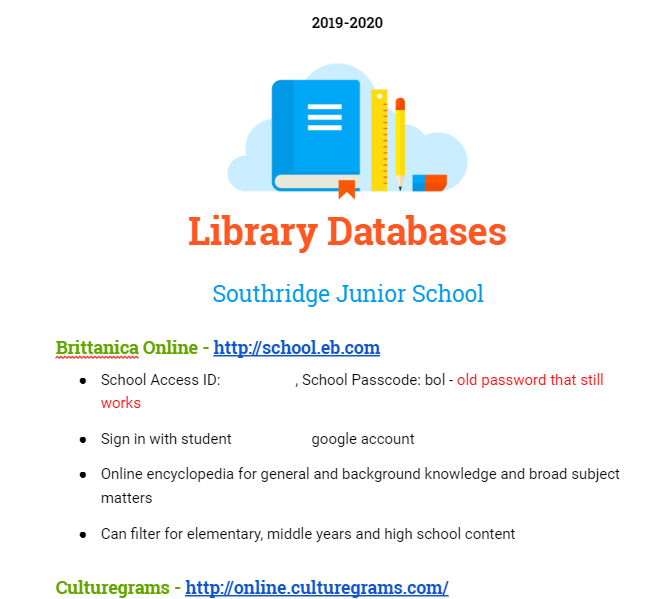

Examples of my Google Docs and Slides so far
I do find some teachers have reservations when implementing new technology, simply because it takes them longer to master. In these instances, they benefit from one-on-one or small group instruction, but once they get going they are confident. I also think it’s always a great idea elicit teacher buy-in with upgrading ICT skills by inspiring them. The ISTE video about Rethinking Digital Citizenship that I posted about a few weeks ago remains my inspirational source, and I will strategically share this with my staff when I have finalized and polished all the documents I am creating for them.
Our school benefits from having a K-7 Technology Leader, so the responsibility does not actually rest on me to provide IT support. She is the one in charge of the school’s ICT curriculum and pedagogy with me and in some ways, my role with technology learning has been watered down to providing media literacy and research skills, in spite of the fact that I continue to complete a great deal of professional development with technology. This doesn’t bother me, as honing my ICT skills can only help me to improve as an educator. Plus, we collaborate well together and are currently working on drafting a cohesive Digital Citizenship Scope and Sequence. I do find it interesting how our positions are somewhat parallel positions (we both work with K-7 students, lead inservice workshops and share resources with teachers, have administrative duties that include budgeting) but are not regarded in a similar sense. It reminds me of how advocacy will forever remain a part of a librarian’s role, particularly in a 21st century learning commons.
Although this video is five years old, it captures what modern school libraries are becoming and highlights the struggle with public perception of libraries that remains. (On a side note, this video led me to the hashtag #SchoolLibrariesMatter, which I greatly appreciated)
Finally, one area of digital citizenship that I find does not come up as frequently is copyright laws and infringement. It is an area of digital citizenship that most people need to be aware of daily, particularly teachers. We really need to model copyright and fair use; however, it isn’t exactly the most riveting subject matter, and I know for certain that teachers (myself included) are not completely confident with their knowledge in this area. I tried to take a MOOC course on Copyright and never saw it through. This is certainly an area for growth that I am eager to share. I do find videos and visual explanations on Copyright are the most useful, so I scoured YouTube for good quality, entertaining videos. There weren’t many options. It might be another instance of needing to create something for myself. In the interim, I wanted to share what I found here and perhaps our community can help me vet these resources before I share them with colleagues.
Common Sense Media clearly explains the concept in this video, though it’s a bit slow and dry:
Sometimes music can be a helpful mnemonic, though the quality of the message is debatable and the comments section should be avoided:
There is a comprehensive collection of copyright education resources here that is scaffolded for a wide range of grades. Again, the quality of the videos are not at the standard I would personally select.
Finally, this website has a nice selection of recommended resources, including other blogs, podcasts, and videos: https://www.teachingcopyright.org/resources.html
Works Cited
Capstone Publishers. (2014, October 22). School Libraries Matter: The Changing Role of the School Librarian. Retrieved October 18, 2019, from https://youtu.be/6eilZJp3_h8.
Common Sense Media. (2014, September 5). Copyright and Fair Use Animation. Retrieved October 19, 2019, from https://www.youtube.com/watch?v=suMza6Q8J08&t=2s.
Copyright and Creativity for Ethical Digital Citizens. (2018). K-12 Teaching Resources on Copyright and Fair Use. Retrieved October 20, 2019, from https://www.copyrightandcreativity.org/.
Electronic Frontier Foundation. (n.d.). Teaching Copyright. Retrieved October 21, 2019, from https://www.teachingcopyright.org/resources.html.
Media Lab Education. (n.d.) Copyright, What’s Copyright. Retrieved October 19, 2019, from https://www.youtube.com/watch?v=0QiO_H0-ok8&t=1s.
Toor, R., & Weisburg, H. K. (2012). New on the job: A school library media specialist’s guide to success. 2nd edition. Chicago: American Library Association.
 The Learning Circle
Well done blog post that contextualizes and explores your journey to a place of leadership and support. I was very pleased to read your thoughts on how T-Ls are leaders, but not administrators and that distinction is very important in creating safe, collaborative environments. I was a little disheartened to read about the resistance to publishing a Library Learning Commons site as part of your program. I can think of so many independent schools that have a vibrant virtual learning commons presence as part of their program to support and engage students and staff. Many good examples, links, references and discussions here that all support implementation and growth of new pedagogy and practices.
LikeLike
I was also shocked to hear of the resistance-I also had a vision of Independent schools as “vibrant” places of learning-it seems like you could have so much more freedom in some ways. Thanks for posting the copyright infringement stuff-I think it’s something I need to look up more, and something I am sometimes in violation of myself (eeeeek)-sometimes it just feels so onerous to do it all “by the book” (that phrase needs updating, lol)..but I also know as a TL that enforcing this will become my responsibility, so I cannot be a hypocrite about it!
LikeLike
Hi Christine. I too was shocked by the resistance to your Learning Commons website. We use ours to help teachers access all kinds of things, like laminating, our chromebooks schedule, databases, Destiny, etc. If it is at all helpful to you, please feel free to check out our website. It’s amaturish, but does the trick for now. http://www.valleyviewvikes.weebly.com
Also, I liked the Common Sense video on Copyright. Here’s a link to information on Media Sense that I thought might be a good suppliment because it is Canadian. http://mediasmarts.ca/digital-media-literacy/media-issues/intellectual-property/fair-dealing-media-education
LikeLike
Thank you for sharing your website. It doesn’t look amaturish at all! Great idea to also including other helpful tips to teachers beyond physical and digital resources.
After meeting with the Marketing & Communications director this week, it’s insightful to see how this differing perspective is entirely from a business and marketing point of view, while I hold the teachers’ and students’ needs in the forefront. We came to an agreement that there would be a Library page locked behind our school website portal, which can be accessed by parents and teachers. Concurrently I am working on a Google Site with the Tech Leader where we will share all the school’s learning technologies as well as link to my Google Site for the library, then share it privately among students and teachers as if it were a shared Google Doc. We were finding that there were many underutilized digital resources, simply because people did not know they were there or did not have one centralized location to find it all.
In the end, our jobs always seem to boil down to access and it’s not always easy making it easy!
LikeLike